NetworkedBlog


Showing posts with label Tutorials. Show all posts
Showing posts with label Tutorials. Show all posts
Saturday, June 6, 2015
 PTU Alicia Mujica Secret Garden Tutorial
 Posted by
Unknown
Posted by
Unknown


For this tutorial I am using the tube of Alicia Mujica called Kiera by Alicia Mujica 2014.
You can purchase it at http://aliciamujicadesign.com/gb/.
You must have a license to use this tube.
The kit I am using is also by Alicia Mujica called The Secret Garden.
Let's start off by making the FB Profile Ava.
Open a 600 x 600 canvas.
Using your magic wand, C/P into selection Imagen20a.
Selections, Select None.
C/P Kiera by Alicia Mujica 2014 and resize 30%.
C/P Cloud by Alicia Mujica 2014 and resize 15%.
Duplicate that layer and place to your liking.
C/P Deco9 by Alicia Mujica 2015 and resize 15%.
C/P Garden Deco 3 by Alicia Mujica 2015 and resize 40%.
C/P Buterfly 1 by Alicia Mujica 2015 and resize 15%.
Next, let's make the FB Timeline Cover.
Open a 851 x 315 canvas.
Using your magic wand, C/P into selection Imagen20a.
Selections, Select None.
C/P Kiera by Alicia Mujica 2014 and resize 20%.
Place tube to the left of the canvas.
C/P Kiera by Alicia Mujica 2014 and resize 50%.
Place tube to the right of the canvas.
C/P Cloud by Alicia Mujica 2014 and resize 15%.
Duplicate twice and place to your liking.
C/P Secret Garden by Alicia Mujica 2015 and resize 25%.
C/P Buterfly by Alicia Mujica 2015 and resize 15%.
I used the following settings for the font.
Font: Brush Script MT
Foreground: #5b7b10
Background: #e83b77
Size: 20
Stroke: 2.0
Add the Artist copyright and your watermark.
For the copyright I used the following:
Font: Arial
Foreground: #5b7b10
Background: #e83b77
Size: 6
Stroke: 1.0
Thank you for trying my tutorial. I would love to see your results.
Please send them to agelesskarmacreations@gmail.com.

Saturday, September 27, 2014
PTU Arthur Crowe's Old School Zombie Tube & Kit Tutorial

I am using the beautiful art work of Arthur Crowe.
It is a tube and kit from his site called Old School Zombie.
You must have a license to use his work.
You can get both at his site.
Open a 600 x 600 transparent canvas.
Using your magic wand, click the canvas.
C/P into selection, OldSchoolZombie_KITPaper(10).
C/P OldSchoolZombie_Kit(16).
C/P OldSchoolZombie_Kit(41) & resize 40%.
Flip this layer horizontal.
Using your magic wand, click the canvas.
C/P into selection, OldSchoolZombie_KITPaper(10).
C/P OldSchoolZombie_Kit(16).
C/P OldSchoolZombie_Kit(41) & resize 40%.
Flip this layer horizontal.
C/P tube of choice & place to your liking.
C/P OldSchoolZombie_Kit(42) & resize 20%.
C/P OldSchoolZombie_Kit(38) & resize 40%.
C/P OldSchoolZombie_Kit(42) & resize 20%.
C/P OldSchoolZombie_Kit(38) & resize 40%.
C/P OldSchoolZombie_Kit(30) & resize 40%.
C/P OldSchoolZombie_Kit(18).
C/P OldSchoolZombie_Kit(17) & resize 30%.
At this time, you can add the Artist Copyright & your Watermark.
C/P OldSchoolZombie_Kit(18).
C/P OldSchoolZombie_Kit(17) & resize 30%.
At this time, you can add the Artist Copyright & your Watermark.
Font: Darkwood from Dafont.
Foreground: #97af5f
Background: #bc1a1d
Size: 48
Stroke: 2.0
I would love to see your results for this tutorial.
Please send them to agelesskarmacreations@gmail.com.
Foreground: #97af5f
Background: #bc1a1d
Size: 48
Stroke: 2.0
I would love to see your results for this tutorial.
Please send them to agelesskarmacreations@gmail.com.
Saturday, August 23, 2014
FB Timeline Cover Set using PTU Sexy Teacher Kit


The tube I have chosen is called Sexy Teacher by Arthur Crowe.
Please ensure you have a license to use his work.
I am using Sexy Teacher Scrap Kit by Mellie/MellieBeans.
You can pick up all three at Arthur Crowe's site.
I will be using C/P for Copy/Paste.
Open a 600 x 600 transparent canvas & a 850 x 315 transparent canvas.
I will start with the FB profile pic first.
Using your magic wand, C/P into selection PP07.
Selections, Select None.
C/P tube & resize 60%.
C/P e6 & resize 40%.
Free rotate this layer 45 degrees to the left.
C/P e3 & e8 & resize 30%.
C/P e4 & e7 & resize 10%.
Now, for the Timeline Cover.
Using your magic wand, C/P into selection PP07.
Selections, Select None.
C/P tube & resize 33%.
C/P e5 & resize 20%
C/P wa02 & resize 40%.
The wording I used on the timeline cover is:
Who's volunteering for detention?
Font: Bradley Hand ITC
Size: 20
Stroke: 2.0
Foreground: #b62428
Background: #d9d9d9
At this time you can add the Artist copyright and your Watermark.
I'd love to see your results of this tutorial.
Please send them to agelesskarmacreations@gmail.com.
Saturday, July 12, 2014
PTU Summer Loving Tutorial

I am using the beautiful PTU kit of Honored Scraps called Scraphonored_IB-SteveBaierJuly2014-bt.
You can purchase this kit at Creative Design Outlet.
This scrap kit was inspired by the Artwork of Steve Baier.
Steve Baier's tube is the July 2014 bonus tube you could get for free if you purchased $10 or more of his products from CDO. This tube will be retired at the end of July 2014.
I will use C/P for Copy/Paste.
Open a 600 x 600 transparent canvas.
C/P Frame_01 & resize 40%
Using your Magic Wand, click inside the frame.
Selections, Modify & Expand by 3
C/P Paper_06 into Selection
C/P Tube & resize to your liking
Selections, Invert & Delete on Keyboard
Selections, Select None
Select the bottom layer and Paste Into Selection Paper_05
C/P WordArt_01
C/P Element_05 & resize 60%
C/P Element_03 & resize 70%
C/P Element_19
At this time, you can add the Artist Copyright.
I used the following setting for the tag name:
Foreground: #392d5a
Background: #fdfdfd
Stroke: 3.0
Font: French Script MT
Size: 48
I'd love to see your results of this tutorial.
Please send them to agelesskarmacreations@gmail.com
Wednesday, July 2, 2014
PTU Kit Arthur Crowe's Air Goddess FB Timeline Set


It also comes together in a combo that you can also get at his site.
You must have a license to use his work.
You can get both at his site.
Open a 600 x 600 transparent canvas.
I will use C/P for Copy/Paste
C/P 25
C/P 8 & resize 40%
C/P tube & resize to your liking
C/P 17 & free rotate 45 degrees to the left
C/P 7
C/P 9
Select your background layer & C/P into selection P6
At this time you can add the copyright.
Setting for: ©Arthur Crowe
Foreground: #000000
Background: #7aa6da
Font: Shonar Bangla
Stroke: 1.0
Size: 10
Setting for: Arthur Crowe's Air Goddess
Foreground: #000000
Background: #7aa6da
Font: Monotype Corsvia
Stroke: 2.0
Size: 20
I'd love to see your results of this tutorial.
Please send them to: agelesskarmacreations@gmail.com.
Saturday, June 28, 2014
PTU Happy Canada Day, Eh! Tutorial

I am using the beautiful kit of Cindy's Creative Designs called Canada Eh, you can get it at PFD .
I am also using the tube of Ismael Rac called 2013 BB Fun Summer.
You must have a license to use his work. You can get both at his site.
Open a 600 x 600 transparent canvas.
Using your magic wand, select the canvas.
C/P into selection ccd_fireworks1
Selections, select none.
Next, I went ahead and C/P my tube. I resize the tube to 40%.
C/P ccd_ballon1 & resize 40%.
C/P ccd_ButtonRibbon2 & resize 80%.
C/P ccd_fireworks3 & resize 45%.
C/P ccd_kite1 & resize 30%.
At this time, you can add the copyright information.
Settings for the Copyright:
Foreground: #fc1915
Background: #faf4f5
Font: Arial Black
Size: 11
Stroke: 2.0
Settings for the Tag Name:
Forground: #efefef
Background: #a81d1f
Font: Cooper Black
Size: 40
Stroke: 2.0
I'd love to see your results of this tutorial. Please send them to agelesskarmacreations@gmail.com.
Thursday, June 5, 2014
I Rise... FB Profile Pic & Timeline Cover Tutorial
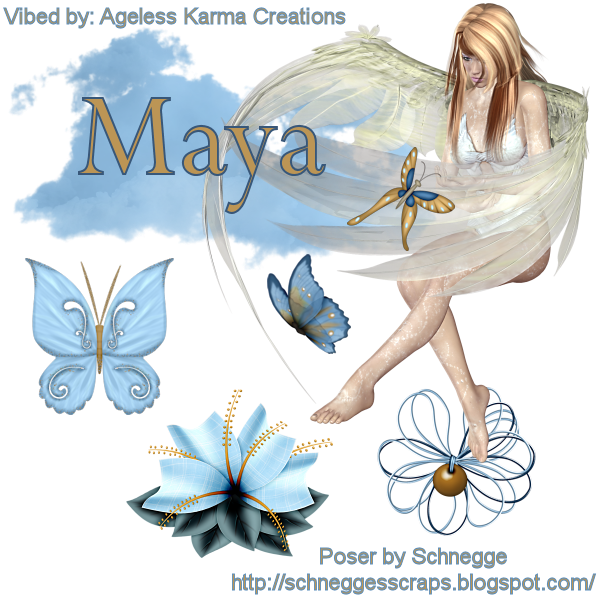

I am using the FTU Kit of Schnegge's Scraps called Angel In Heaven
I will be using the Poser that comes with the kit.
I will use C/P for Copy/Paste.
This tutorial will be for a Facebook Profile Pic & Timeline Cover
For the Facebook Timeline Cover:
Open a 851 x 315 transparent canvas
C/P Poser_AngelInHeaven_Schnegge & resize 60%
C/P Cloud_AngelInHeaven_Schnegge
C/P Butterfly1_AngelInHeaven_Schnegge & resize 40%
C/P Butterfly5_AngelInHeaven_Schnegge & resize 40%
C/P WireFlower1_AngelInHeaven_Schnegge
C/P Flower09_AngelInHeaven_Schnegge
C/P Buttefly3_AngelInHeaven_Schnegge & resize 60%
For the Facebook Profile Picture:
Open a 600 x 600 transparent canvas.
C/P Poser_AngelInHeaven_Schnegge
C/P Cloud_AngelInHeaven_Schnegge
C/P Butterfly1_AngelInHeaven_Schnegge & resize 40%
C/P Butterfly5_AngelInHeaven_Schnegge & resize 40%
C/P WireFlower1_AngelInHeaven_Schnegge
C/P Flower09_AngelInHeaven_Schnegge
I am using the following colors for the Copyright & Watermark:
Foreground: #5a8dbb
Background: #bc9555
Stroke: 1.0
Font: Perpetua
Size: 8
Tag Name:
Foreground: #5a8dbb
Background: #bc9555
Stroke: 2.0
Font: Perpetua
Size: 48
I'd love to see your results of my tutorial.
Please send them to agelesskarmacreations@gmail.com.
Sunday, May 25, 2014
PTU Beach Fun with Garv Tutorial

I am using:
Lori Mermaid by Keith Garvey
PTU Beach Fun Kit by Keith Garvey
Please ensure you have a license to use his work. You can get all three at his site.
I will be using:
C/P for Copy/Paste
&
a Drop Shadow on most layers
Open a 600 x 600 transparent canvas.
C/P e4 & resize 50%
C/P e28 & resize 75%
C/P e48 & resize 15%
C/P e16 & resize 25%
C/P e11 & resize 50%
C/P e32 & resize 30%
C/P e13 & resize 50%
Duplicate layer & Flip Horizontally
I duplicated a few of e13 to cover the top of the mermaid.
C/P e1 & resize 35%
C/P e2 & resize 30%
C/P e3 & resize 25%
C/P e49 & resize 20%
Colors are as follows:
Copywrite & Watermark:
Foreground: #ed6324
Background: #00579d
Stroke: 1.0
Font: Arial
Tag Name:
Foreground: #ed6324
Background: #00579d
Stroke: 2.0
Font: M V Boli
I'd love to see your results of this tutorial.
Please send them to agelesskarmacreations@gmail.com.
Friday, January 24, 2014
PTU Keith Garvey Tube & Kit Tutorial

In this tutorial, I will be using items from Keith Garvey's website.
I am using the tube Be Mine & the kit is Lil Valentine.
Please ensure you have a license to use Keith Garvey's work.
You can get everything you need on his Garv Girls PSP Tube Store site.
Please use my tag as a reference to place elements.
I will use C/P for Copy/Paste.
Open a new 600 x 600 transparent canvas.
C/P e11 & resize 60%.
Using your Magic Wand, click inside the heart.
Selections, modify, Expand by 3.
C/P the close up of your tube into the heart.
Resize tube to 40% & place to your liking.
Selections, Invert & Delete on keyboard.
Selections, Select None.
C/P e9 & resize 40%.
C/P e2
C/P e1
C/P e29 & resize 50%.
C/P e23 & resize 50%.
C/P e24 & resize 40%.
C/P e19
C/P e8 & resize 50%.
C/P e3 & resize 50%.
At this time I will add the Artist Copyright & my Watermark.
Settings for Copyright & Watermark:
Foreground: 0, 0, 0
Background: 240, 73, 101
Stroke: 1.0
Font: Arial
Size: 16
Settings for Tag Name:
Foreground: 0, 0, 0
Background: 270, 40, 101
Stroke: 2.0
Font: Vivaldi
Size: 72
I'd love to see your results of this tutorial.
Please send them to agelesskarmacreations@yahoo.com.
Sunday, November 17, 2013
CT Tag Tutorial PTU Lazy Autumn Kit

For this tutorial, I am using a beautiful fall kit called Lazy Autumn by Blue Butterfly Designs.
You can get this kit at Bee'N Creative 4 Less store.
I am also using a template by Cherry Berry Designs called im_Bitchin template that I received for a challenge in the Bee'N Creative 4 Less Forum. Thanks Cherry Berry!
I am using Anna Marine's Anna Marine Individual Tube 13-3.
You can get this tube & a license to use her work at the Creative Design Outlet.
You can use one of the frames from the kit, if you'd like.
I will be using the template I received from Cherry Berry.
I do not have a link to the template or I would've post it for use in this tutorial.
I will use C/P for Copy/Paste.
Please use my tag as a reference to place your elements.
C/P bcs_lad_elements (19) & resize 65%.
C/P bsc_lad_elements (17) & resize 65%.
Duplicate & flip horizontally.
C/P bsc_lad_elements (57) & resize 30%.
Duplicate this layer.
C/P bsc_lad_elements (11)
C/P bsc_lad_elements (36) & resize 40%.
C/P bsc_lad_elements (15) & resize 40%.
C/P bsc_lad_elements (46) & resize 50%.
C/P bsc_lad_elements (45) & resize 50%.
C/P bsc_lad_elements (29) & resize 50%.
At this time you can add the Artist Copyright & your Watermark.
I will be using the following settings for the Copyright & Watermark:
Font: Arial
Style: Bold
Stroke: 1.0
Size: 18
Foreground: #715flc
Background: #a03939
I will be using the following setting for the Tag Name:
Font: Britannic Bold
Style: Bold
Stroke: 2.0
Size: 60
Foreground: #715flc
Background: #a03939
I'd love to see your results! Please send them to agelesskarmacreations@yahoo.com.
 Labels:
Anna Marine,
Bee-N Creative CT Tag,
Blue Butterfly Designs,
Cherry Berry Designs,
PTU Kit Tutorial,
Template,
Tutorials
|
Labels:
Anna Marine,
Bee-N Creative CT Tag,
Blue Butterfly Designs,
Cherry Berry Designs,
PTU Kit Tutorial,
Template,
Tutorials
|
 0
comments
0
comments
Wednesday, November 13, 2013
CT Tag Tutorial PTU BlueBerry Tagger Kit
CT Ageless Karma Creations for JTs Designs.

You must have a license to use his work and you can get both at his site.
Today, I am using JTs Design's scrap kit called BlueBerry Tagger.

The colors in this kit are very lovely.
You can purchase this kit at Bee'N Creative 4 Less.
Don't forget to drop by JTs Designs site & check it out.
I will use C/P for Copy/Paste.
Please use my tag as a reference to place elements.
To start off, I want you to open a 600 x 600 transparent canvas.
C/P JTD_B_6 & resize 60%
Using your Magic Wand, click inside the frame
Selections, Modify & Expand by 3
C/P JTD_B_Paper7
Selections, Invert & Delete on keyboard
C/P your tube into the frame
Place to your liking
Delete on keyboard
Closing your background layer, merge the layers that are visible.
C/P JTD_B_2 & resize 40%
Duplicate this layer.
C/P Forget me not & resize 40%
Duplicate this layer.
C/P JTD_B_33 & resize 30%
Duplicate this layer.
C/P JTD_B_27
C/P JTD_B_26 & resize 80%
C/P JTD_B_29 & resize 40%.
C/P JTD_B_24 & resize 50%.
C?P JTD_B_28 & resize 50%.
C/P JTD_B_22 & resize 30%.
At this time, I will C/P my full size tube
Next, add the Artist Copyright & your Watermark
I always save work as a pspimage file, but do not forget to save your work as a png file as well.
I used the following for the Copyright & Watermark:
Font: Arial
Size: 16
Stroke: 1.0
Style: Bold
Foreground: #63534c
Background: #1c4984
I used the following for the Tag Name:
Font: CoventryGarden
Size: 90
Stroke: 3.0
Style: Bold
Foreground: #1c4984
Background: #b0e2f4
I'd love to view your results, please send them to agelesskarmacreations@yahoo.com.
Happy Designing!
Place to your liking
Delete on keyboard
Closing your background layer, merge the layers that are visible.
C/P JTD_B_2 & resize 40%
Duplicate this layer.
C/P Forget me not & resize 40%
Duplicate this layer.
C/P JTD_B_33 & resize 30%
Duplicate this layer.
C/P JTD_B_27
C/P JTD_B_26 & resize 80%
C/P JTD_B_29 & resize 40%.
C/P JTD_B_24 & resize 50%.
C?P JTD_B_28 & resize 50%.
C/P JTD_B_22 & resize 30%.
At this time, I will C/P my full size tube
Next, add the Artist Copyright & your Watermark
I always save work as a pspimage file, but do not forget to save your work as a png file as well.
I used the following for the Copyright & Watermark:
Font: Arial
Size: 16
Stroke: 1.0
Style: Bold
Foreground: #63534c
Background: #1c4984
I used the following for the Tag Name:
Font: CoventryGarden
Size: 90
Stroke: 3.0
Style: Bold
Foreground: #1c4984
Background: #b0e2f4
I'd love to view your results, please send them to agelesskarmacreations@yahoo.com.
Happy Designing!
Thursday, October 3, 2013
CT Tag Tutorial PTU Fall Magic

I am using the PTU kit called Fall Magic by AmyMarie's Kit Store.
I will use C/P for Copy/Paste.
I will use D/S for Drop Shadow.
The D/S setting is: 15, 8, 100 & 10
Please use my tag as a reference to place elements.
Open a 600 x 600 transparent canvas.
C/P 22 & resize 60%.
Add a Drop Shadow.
C/P 51 & resize 40%.
C/P 7 & resize 30%.
C/P 3 & resize 30%.
C/P 26.
C/P 40 & resize 40%.
C/P 49 & resize 25%.
C/P 23 & resize 70%.
C/P 84 & resize 40%.
C/P 6 & resize 30%.
C/P 25 & resize 10%.
C/P 4 & resize 20%.
C/P 55 & resize 20%.
Free rotate this layer 40 degrees to the Left.
C/P 54 & resize 20%.
Free rotate 40 degrees to the Right.
C/P 56 & resize 20%.
C/P 14 & resize 40%.
C/P 9.
Free rotate this layer 180 degrees.
At this time you can add the Artist Copyright & your Watermark.
COPYRIGHT & WATERMARK
Font: Arial
Size: 16
Style: Bold
Stroke: 1.0
Foreground: #19423e
Background: #c92006
TAG NAME
Font: Footlight LT Light
Size: 90
Style: Bold
Stroke: 2.0
Foreground: #19423e
Background: #c92006
I'd love to see your results. Please send them to agelesskarmacreations@yahoo.com.
Sunday, September 29, 2013
CT Tag Tutorial #2 PTU Amy Mega Kit

I am using the beautiful Mega Kit called Amy by AmyMaire's Kit Store.
I am using the tube called Katherine by Keith Garvey.
You must have a license to use his work. You can get both at his site.
I am using VIXPSP mask called Vix_Mask344.
I will use C/P for Copy/Paste.
Please use my tag as a reference to place elements.
Open a 600 x 600 transparent canvas.
Using your Magic Wand, C/P into Selection pp31.
C/P WLC_wordart 4 & resize 80%.
C/P 146.
C/P 135 & resize 60%.
C/P 122 & resize 60%.
C/P 188 & resize 60%.
C/P 151 & 152.
Resize both layers 60%.
C/P 206 & resize 40%.
C/P 207 & resize 40%.
C/P 51 & resize 40%.
C/P 76 & 77.
Resize both layers 60%.
At this time, I will list the setting for the Copyright, Watermark & Tag Name.
Fonts:
Copyright & Watermark: Arial
Tag Name: Lamplighter Script
Foreground: #b7b29a
Background: #bc395f
Size:
Copyright & Watermark: 16
Tag Name: 72
Stroke:
Copyright & Watermark: 1.0
Tag Name: 2.0
Style: Bold
I'd love to see your results of this tutorial.
Please send them to agelesskarmacreations@yahoo.com.
CT Tag Tutorial PTU Amy Mega Kit

I am using the beautiful Mega Kit called Amy by AmyMarie's Kit Store.
I am also using the artwork of Keith Garvey. This tube is called Honey.
You must have a license to use his work. You can get both at this site.
I will be working with the file AM_Amy_04.
Open Clusters by Rosey & open Cluster #3 in PSP.
Open a 600 x 600 transparent canvas.
C/P Cluster #3.
Using your Magic Wand, C/P your tube of choice into the black part of the frame.
I added my tube again, but the full size.
At this time, I added my Artist Copyright, my Watermark & Tag Name.
Font: Vijaya
Size: 16 Copyright & Watermark
Size: 100 Tag Name
Stroke: 1.0 Copyright & Watermark
Stroke: 2.0 Tag Name
Style: Bold
Foreground: #000000
Background: #bc395f
I'd love to see your results of this tutorial.
Please send them to: agelesskarmacreations@yahoo.com.
CT Tag Tutorial PTU Kit On Dragonfly Wings

I am using a beautiful kit called On Butterfly Wings by AmyMarie's Kit Store.
I am using a tube by Ana Rasha. You can find her work on Deviant Art.
C/P into Selection pp8
Now, you can add your mask.
C/P 54 & resize 60%.
Now, you can add your mask.
C/P 54 & resize 60%.
C/P 1 & resize 60%.
C/P 53 & resize 50%.
C/P 27.
C/P 44 & resize 70%.
Duplicate & flip the Dup horizontally.
C/P 51 & resize 40%.
Duplicate 3 times.
C/P 32.
C/P 65.
C/P 64 & resize 50%.
C/P 68 & resize 40%.
C/P 78 & resize 40%.
Duplicate the last two layers & flip them horizontally.
C/P 120 & resize 40%.
Duplicate this layer.
C/P 129 & 130. Resize 40%.
C/P 131 & 132. Resize 40%.
At this time you can add the Artist Copyright & your Watermark with the following settings.
Font: Arial
Stroke: 1.0
Style: Bold
Size: 18
Foreground: #041533
Background: #d1e5d8
I used these settings for the Tag Name:
Font: Trash Butterfly
Stroke: 2.0
Style: Bold
Size: 100
Foreground: #000000
Background: #53b7ce
I'd love to see your results of this tutorial.
Please send them to agelesskarmacreations@yahoo.com.
C/P 27.
C/P 44 & resize 70%.
Duplicate & flip the Dup horizontally.
C/P 51 & resize 40%.
Duplicate 3 times.
C/P 32.
C/P 65.
C/P 64 & resize 50%.
C/P 68 & resize 40%.
C/P 78 & resize 40%.
Duplicate the last two layers & flip them horizontally.
C/P 120 & resize 40%.
Duplicate this layer.
C/P 129 & 130. Resize 40%.
C/P 131 & 132. Resize 40%.
At this time you can add the Artist Copyright & your Watermark with the following settings.
Font: Arial
Stroke: 1.0
Style: Bold
Size: 18
Foreground: #041533
Background: #d1e5d8
I used these settings for the Tag Name:
Font: Trash Butterfly
Stroke: 2.0
Style: Bold
Size: 100
Foreground: #000000
Background: #53b7ce
I'd love to see your results of this tutorial.
Please send them to agelesskarmacreations@yahoo.com.
Saturday, September 28, 2013
CT Tag Tutorial #1 PTU October Girls Mega Kit

I am using the beautiful Mega Kit called October Girls.
You can get it at AmyMarie's Kit Store.
It was put together by some of AmyMarie's CT Team along with AmyMarie.
I am using the amazing artwork of Keith Garvey. The tube is called GoGo.
You must have a license to use his work. You can get both at his site.
I will use C/P for Copy/Paste.
Please use my tag as a reference to place elements.
Open the folder October Girls 2.
Open the folder Roseys 5pk Cluster.
Select CLUSTER#5 to open it.
On the cluster layers, Select Raster 2.
C/P the tube of your choice.
At this time, you can add the Artist Copyright & your Watermark.
Copyright & Watermark:
Foreground: #000000
Background: #f789b4
Font: Arial
Size: 18
Style: Bold
Stroke: 1.0
Tag Name Info:
Foreground: #000000
Background: #f789b4
Size: 100
Style: Bold
Stroke: 2.0
I'd love to see your results of the tutorial.
Please send them to agelesskarmacreations@yahoo.com.
Wednesday, September 25, 2013
CT Tag Tutorial PTU Vanity 2

You can get it at her store called AmyMarie's Kit Store.
I will use C/P for Copy/Paste.
Please use my tag as a reference to place elements.
Open a 600 x 600 transparent canvas.
C/P 40 & resize 60%.
C/P into Selection pp9.
C/P 41 & resize 50%.
C/P in Selection pp12.
C/P Wordart 3 Vanity 2 & resize 80%.
C/P 69, 70 & 71.
Resize these layers 45%.
Duplicate these layers.
C/P 13 & resize 45%.
C/P 80 & resize 80%.
C/P 6 & resize 30%.
C/P 5 & resize 25%.
C/P 1 & resize 40%.
C/P 45.
C/P 84 & resize 40%.
At this time, you can add the Artist Copyright & your Watermark.
I am using the following for the Copyright & Watermark:
Font: Arial
Size: 16
Stroke: 1.0
Style: Bold
Foreground: #ac6daf
Background: #ffffff
I am using the following for the Tag Name.
Font: Burton's Nightmare
Size: 90
Stroke: 2.0
Style: Bold
Foreground: #ffffff
Background: #ac6daf
I'd love to see your results of this tutorial.
Please send them to agelesskarmacreations@yahoo.com.
I'd love to see your results of this tutorial.
Please send them to agelesskarmacreations@yahoo.com.
Monday, September 23, 2013
CT Tag Tutorial PTU kit Vanity

I am using the PTU kit called Vanity by AmyMarie's Kit Store.
You must have a license to use Nocturne's work. You can get both at PFD.
I will use C/P for Copy/Paste.
Please use my tag as a reference to place elements.
Open a 600 x 600 transparent canvas.
C/P 98 & resize 80%.
C/P 92 & resize 80%.
Free rotate 45 degrees to the Right.
C/P 67 & resize 80%.
C/P 35 & resize 60%.
Free rotate 45 degrees to the Left.
C/P 34 & resize 50%.
C/P 24.
C/P 33 & resize 50%.
C/P 81.
C/P 52.
C/P 15 & resize 30%.
C/P 66 & resize 30%.
C/P 56 & resize 25%.
C/P 58 & resize 35%.
At this time you can add the Artist Copyright & your Watermark.
I used for following for fonts & colors.
Copyright & Watermark:
Font: Arial
Size: 16
Style: Bold
Stroke: 1.0
Foreground: #59ced6
Background: #61261b
Tag Name:
Font: Baroque Script
Size: 48
Style: Bold
Stroke: 2.0
Foreground: #59ced6
Background: #61261b
I'd love to see your results of this tutorial.
Please send them to agelesskarmacreations@yahoo.com.
Sunday, September 22, 2013
CT Tag Tutorial PTU Halloween Spook

I am using the PTU kit called Halloween Spook by AmyMarie.
I am using the tube called Witch by Keith Garvey.
You must have a license to use his work. You can get both at his site.
Open a 600 x 600 transparent canvas.
C/P 48 & resize 50%.
C/P 44 & resize 40%.
C/P 37.
C/P 15 & resize 80%.
C/P 49 & resize 20%.
C/P 51 & resize 50%.
C/P 12 & 13 & resize 30%.
C/P 59 & resize 90%.
C/P 60.
C/P 20 & resize 50%.
At this time you can add the Artist Copyright & your Watermark.
For this step, I used the following:
Font: Arial
Foreground: #000000
Background: #e9720f
Stroke: 1.0
Style: Bold
Size: 16
Tag Name Settings:
Font: Halloween Spook
Foreground: #000000
Background: #e9720f
Stroke: 2.0
Style: Bold
Size: 72
I'd love to see your results of this tutorial.
Please send them to agelesskarmacreations@yahoo.com.
CT Tag Tutorial PTU Kit Samaelia

You can purchase this kit at AmyMarie's Kit Store.
I am using the matching tube called Samaelia by Alehandra Vanhek.
You have a license to use Alehandra's work. You can get both at PFD.
I will use C/P for Copy/Paste.
Please use my tag as a reference to place elements.
Open a 600 x 600 transparent canvas.
Paste Into Selection, pp17.
C/P 78.
C/P 33 & resize 40%.
C/P 40 & resize 50%.
C/P 25 & resize 70%.
C/P 75 & resize 50%.
C/P 1 & resize 30%.
C/P 77 & resize 80%.
C/P 20 & resize 50%.
C/P 3 & resize 30%.
C/P 50 & resize 15%.
C/P 51 & resize 10%.
C/P 49 & resize 15%.
C/P 52 & resize 10%.
At this time, you can add the Artist Copyright & your Watermark.
I am using the following:
Font: Arial
Foreground: #0b398c
Background: #ffffff
Stroke: 1.0
Style: Bold
Size: 16
Tag Name
Font: Harrington
Foreground: #0b398c
Background: #b05f84
Stroke: 2.0
Style: Bold
Size: 72
I'd love to see your results of this tutorial.
Please send them to agelesskarmacreations@yahoo.com.
Subscribe to:
Comments (Atom)
Copyrighted
 "Copyright ©AgelessKarmaCreations 2013
All rights Reserved"
"Copyright ©AgelessKarmaCreations 2013
All rights Reserved"
My Blinkie

I Gladly CT for:

Member Of the Following



CU Licenses


Places I Love to Visit