NetworkedBlog


Showing posts with label Dec2011. Show all posts
Showing posts with label Dec2011. Show all posts
Monday, January 9, 2012
 Ismael Rac's Sexy Deer Kit
 Posted by
Unknown
Posted by
Unknown

I am using the awesome work of Ismael Rac. You can purchase the tube & kit at his website here.
We will open a 600 x 600 transparent canvas.
I will use C/P for Copy/Paste.
Please use my tag as a reference as to where to place elements.
The first C/P Snow element.
Next, C/P Frame & resized to 50%.
Next, use your magic wand & click inside the frame.
Next, C/P your SexyDeerHD02 tube & resize to 40%.
Next, select SELECTIONS, INVERT, DELETE on keyboard, SELECTIONS, SELECT NONE.
Next, C/P tree2 & resize to 30%.
Next, C/P presents & resize to 30%.
Next, C/P bow & resize to 30%.
Next C/P candles & resize to 30%.
Next add your Copywrite & Don't for get to add your Watermark.
For the Font:
Foreground: 207-154-69
Background: 37-0-0
You can use a Font of your choice.
Hope you enjoyed doing this tutorial.
 Labels:


Friday, December 23, 2011
Ageless Karma Creations Tutorial - Amy Marie's Merry Christmas Blue Kit

I am using the PTU kit of Amy Marie. It is called Merry Christmas_Blue. You can purchase it here.
I am using the work of Elias Chatzoudis. You need to have a license to use his work. You can get both here.
I will use C/P for Copy and Paste.
Also, please use my tag as reference as to where to place elements.
Open a 600 x 600 transparent canvas.
Next, C/P your tube of choice & resize to 60%.
Next, C/P treeQB & resize 75%.
Next, C/P packages & resize 35%.
Next, C/P giftbox1 & resize 30%.
Next, kitteningiftbox & resize 30%.
Next, C/P puppywstocking & resize 40%.
Next, C/P rockingdeer & resize 60%.
Next, C/P window3 & resize 60%. Duplicate & mirror your duplicate.
Next, C/P bells & resize to 30%.
Next, using your magic wand, select each window pane. I had to close off my tube & the rocking horse layers to do this part of the tut. So, as i said, using your magic wand, select each window pane. I started with the window on the right.
Next, C/P winterpp2. I then moved the paper around to position the part of the paper I wanted to show in the window panes.
Next, go up to Selections, select Invert & then Delete on your keyboard. This will delete the paper not in the window panes.
Next, do the same to the other window. With the other window I closed off the layer treeQB. After your are done with the windows, you can reopen the layers you closed off.
Don't forget to add the copyright & your watermark.
For the font, I used the following:
Font: SantasSleighFull
Font Style: Bold
Stroke: 2.0
Foreground: Black
Background: 171-207-212
I'd love to see your results! Please send them to adrienneem@me.com.
Friday, December 16, 2011
Ageless Karma Creations Tutorial with Amy Marie's Candy Cane Kit

I am using the PTU kit called Candy Cane by Amy Marie. You can get it here.
The tube is by Ismael Rac. You can get it here at his site. Make sure if you use his tubes that you have a license to do so.
The mask, DBV Xmas Mask 14 is by Designs by Vaybs. You can get it here. You will need to scroll down the page & find & download Xmas Masks 09-16.
Please don't forget to leave love for Amy & Vaybs!
In this tutorial, I will use C/P for Copy/Paste.
Please us my tag as a reference as where to place elements.
Open a new canvas using 600 x 600 with a transparent background.
To start off, open your mask & minimize.
Next, open & C/P paper, pp20.
Applying DBV Xmas Mask 14:
Select Layers at the top of your screen. Select, New Mask Layer. Then select, From Image. From your drop down menu select your mask. Make sure the box for Invert Mask Data is UNCHECKED. Click Ok.
Next, C/P your tube. If you are using the same tube as I am, resize her to 80%.
Next, select Layers & Merge & Merge Group.
Next, C/P candycaneplant & resize 30%.
Next, C/P garland1.
Next, C/P candycanewbells2 & resize 40%.
Next, C/P ball2 & resize 25%. Duplicate & mirror.
Next, C/P ball9 & resize 25%. Duplicate & mirror.
Next, C/P snowflake9 & resize 15%.
Last, C/P candycanestick2.
Don't forget to add your copyright & your watermark.
The font for Amy's name is as follows:
Font: Santasleighfull, you can get it here.
Font Style: Bold
Stroke: 1.0
Foreground: Black
Background: Paper pp1 from the kit.
I'd love to see your work! Please send all results to adrienneem@me.com.
I'd love to see your work! Please send all results to adrienneem@me.com.
Friday, December 9, 2011
Ageless Karma Creations Tutorial for Amy Marie's AM_Christmas Purple Kit

I am using a beautiful kit called AM_ Christmas Purple by Amy Marie. It is a PTU kit & you can pick it up here. I am also using the amazing work of Elias Chatzoudis. You need a license to use his art & you can pick up both here.
I will be using C/P for Copy/Paste & please use my tag as a reference for where to place elements.
To start off, I opened a 600 x 600 transparent canvas.
Next, C/P ChristmasTree & resize to 70%
Next, C/P your tube of choice. If you are using the same tube as I am resize her to 50%.
Next, C/P Giftpacks & resize to 15%.
Next, C/P cocomug & resize to 15%.
Next, C/P giftbox1 & resize to 15%.
Next, C/P candycaneplant & resize to 40%.
Next, C/P giftbox3 & resize to 30%.
Next, C/P garland & resize to 110%. This way it goes all the way across the tag.
Next, C/P bell1, bell2 & bell3. All three will be resized to 15%.
The color for the tag name (Amy Marie) is as follows:
Font: SnagglePuss
Stroke: 1.0
Font Style: Bold
Font Foreground: 17-64-17
Font Background: 132-73-139
FONT DROP SHADOW:
Add a drop shadow as follows: 21-1-70-9
Drop Shadow Color: 150-171-108
I would love to see your work! Please send all results to adrienneem@me.com
Sunday, December 4, 2011
Ageless Karma Creations - Amy Marie's Christmas Red PTU Kit Tutorial

I am using the wonderful work of Amy Marie. This is her PTU Scrap Kit called Christmas Red. You can purchase it here at her blogspot.
I am using the beautiful work of Elias Chatzoudis. You may purchase his work here at PTE.
The font I am using is called Flakes. You can get it here.
Use my tags as a reference as to where to place the elements.
C/P = Copy/Paste
To start off, we will open a 600 x 600 transparent canvas.
The first element we will C/P is the frontentrance & resize to 80%.
Next, let's C/P SnowA & duplicate 2 times. I positioned the duplicates to make it look as if it is really snowing outside of the front entrance.
Next, C/P the MetalTree & resize to 65%.
Next, C/P Christmassign & resize to 65%.
Next, C/P giftpackages & resize to 25%.
Next, C/P giftboxkitten & resize to 25%.
Next, C/P Rudolph-2 & resize to 30%.
Next, C/P wreath2 & resize to 15%.
Next, add your tube of choice. If you are using the same tube as I am:
C/P & resize to 50%.
Add your copyright, watermark & license #.
Font for Copyright & Watermark is Arial.
Font for Tag Name is Flakes
Font Style: Bold
Stroke: 1.0
Foreground: 114-11-16
Background: 204-186-91
I would love to see your results! Please send them to agelesskarmacreations@live.com.
Monday, November 28, 2011
Ageless Karma Creations Tutorial for Amy Marie's PTUChristmasSnow_AM Kit

I am using the wonderful work of Elias Chatzoudis. You may purchase his work here.
The PTU Kit I am using comes from Amy Marie's personal blogspot. It is called ChristmasSnow_AM. You may purchase it here.
I will use C/P = Copy/Paste
Please use my tag as reference as where to place the elements.
I started off by opening a 600 x 600 transparent canvas.
The first element I chose was the snow. I did not resize this element at all.
Next is the snowflakeframe2am. I resized this element to 30% & move it to the top left hand corner of the canvas.
Next using the magic wand, click inside the frame.
C/P your tube of choice & position it inside the frame how you want it to look. I chose her to show from the waist up.
Next, choose the following options:
- Selections
- Invert
- Delete (on Keyboard)
- Select None
Next, C/P snowtree2 & resize to 80%.
The next set of elements will go on the snowtree. Please use my tag as a reference.
Next, C/P candycane1 & resize to 20%
Next, you will need to C/P the following elements & resize them to 10%
- snowflakeam2
- snowflakeam1
- balls_HollyBW2
- Ball1
Font: Christmas/Flakes, you can get it here.
Font Style: Bold
Stroke: 1.0
Foreground: 51-128-153
Background: 72-90-47
I would love to see your results, please send them to agelesskarmacreations@live.com.
Sunday, November 27, 2011
Ageless Karma Creations Tutorial for Amy Marie's PTU ChristmasTime Kit
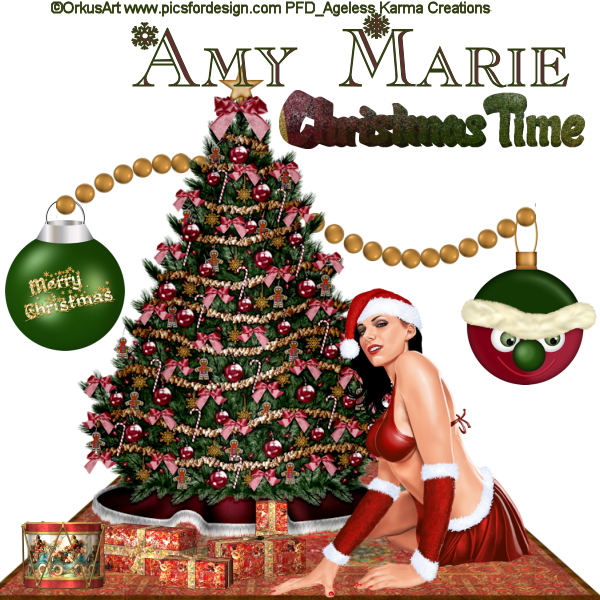
Today, I am using the work of Orkus Art. You can purchase Orkus Art work here.
I am also using the PTU kit called Christmas Time made by AmyMarie. You can purchase her work here.
Please use my tag as a reference as to where to place the elements. Also, I will use the following in this tutorial, Copy/Paste = C/P.
To start off, we will open a 600 x 600 transparent canvas.
I first C/P carpet & resized to 95%.
Next, C/P christmastreebig & resize to 80%.
Next, if you are using the same Orkus Art tube that I am, you will C/P her & resize to 60 %.
Next, C/P ballme3 & resize to 40%.
Next, C/P drum & resize to 30%.
Next, C/P pres & resize to 45%.
Next C/P ballsanta & resize to 45%.
Next C/P beadwave3 & resize to 80%. You will have to drag this layer down right above the ballsanta & ballme3 layers. This way it looks as if they are hanging from the bead layer.
Next C/P christmastime & resize to 45%.
I used the following for the text for Amy Marie's name:
Font: Christmas/Flakes, you can find it here.
Stroke: 1.0
Font Style: Bold
Foreground: 46-61-16
Background: 105-41-54
I'd love to see your results. Just send them to the email below:
agelesskarmacreations@live.com.
Wednesday, November 16, 2011
Ageless Karma Creations - Amy Marie's Christmas Snow Kit withVintage Christmas Template Tutorial

Amy Marie has done it again!
Here I am using her PTU Christmas Snow Kit & also her Freebie Template called Vintage Christmas.
The tube I have chosen is one of Keith Garvey's newest for Christmas this year. You must have a license to use his work. You may purchase his work here.
Please use my tag as reference as to where to put the elements. I will also be using C/P as Copy & Paste.
To start off, I opened the Vintage Christmas Template. You will have to remove the copyright layer.
I then, opened my tube & if you are using the same one I am, I resized her to 70%. Place her inside the Light Green Square.
C/P snowflake1am & Duplicate twice. I resized it to 5% & placed above left hand corner of template.
C/P candypop & resize to 15% & place above right hand corner of template.
C/P candycane1 & resize to 15% & also place above right hand corner of template.
C/P fancyribbon2 & resize to 50% & place below bottom left hand corner of template. I will use this ribbon to place Amy Marie's name on for the tag.
C/P snowman11 & resize to 20% & place him inside the Red Square on the right side of the template.
C/P snowman & resize to 30% & place him next to the tubes left foot inside the Light Green Square.
C/P Ball_HollyBW2 & resize to 15% & place below bottom right hand corner of template.
C/P snow & merge all the way down between the layers named red & 3.
I then begun to place the different snowflakes around the tube inside the Light Green Square.
C/P snowflakeam1 & resize to 5%. I placed this snowflake as if she is pointing to it.
C/P snowflakeam3 & resize to 5%. Also place inside the Light Green Square.
C/P ball1 & resize to 15%. Place it inside the red square on the right.
C/P ball5 & resize to 15%. Place above snowman/ball inside the red square on the right.
The font I used is called kringle. You can get it here.
I used a Stroke of 1.0 with a Font Style of Bold.
I'd love to see your results. Just send them to the email below.
agelesskarmacreations@live.com
Subscribe to:
Posts (Atom)
Copyrighted
 "Copyright ©AgelessKarmaCreations 2013
All rights Reserved"
"Copyright ©AgelessKarmaCreations 2013
All rights Reserved"
My Blinkie

I Gladly CT for:

Member Of the Following


CU Licenses


Places I Love to Visit


